LenScript
Smart Glasses for Real-Time Transcription and Emotional Awareness
Senior Design Capstone Project at College of Engineering – Department of Computer Science and Engineering. LenScript is an assistive smart glasses system designed to provide real-time speech-to-text transcription combined with sentiment detection and speaker identification.
Developed as a capstone project to enhance accessibility for the hearing-impaired by displaying live captions and emotional context through AR glasses.
Project Overview
LenScript bridges the communication gap for individuals with hearing impairments by providing real-time transcription with emotional context directly on AR glasses. The system processes audio entirely on-device using Apple's frameworks, ensuring privacy and minimal latency.
Key Innovation: Unlike existing solutions, LenScript combines speech recognition with sentiment analysis and speaker identification, providing not just what is being said, but how it's being said and who is saying it.
Key Features
Real-Time Speech-to-Text
Powered by Apple's SFSpeechRecognizer with Whisper integration (13-37% WER). Outperforms Google Speech-to-Text with minimal latency.
Sentiment Analysis
On-device detection using NLTagger with 95% accuracy. Displays emotional context as visual symbols (+, -, =).
Speaker Diarization
MFCC feature extraction for speaker differentiation. DER of ≈17% helps identify who is speaking.
Noise Cancellation
High-pass filtering using AVAudioEngine with +7-9 dB SNR improvement for clear audio.
AR Display Integration
BLE connection to Vuzix smart glasses with live captions and sentiment indicators.
Privacy-First Design
100% offline processing. No cloud dependencies. All data stays on device.
System Architecture
The system follows a sophisticated processing pipeline:
All processing happens on-device using: - Swift for iOS development - AVFoundation for audio processing - CoreML for machine learning models - Natural Language framework for sentiment analysis - Bluetooth Low Energy for AR glasses communication
Technical Implementation
Core Technologies
Key Algorithms
Performance Metrics
| Test Category | Metric | Result |
|---|---|---|
| Speech Recognition | Word Error Rate (WER) | 13-37% |
| Speaker Diarization | Diarization Error Rate (DER) | ≈17% |
| Noise Reduction | SNR Improvement | +7-9 dB |
| Sentiment Analysis | Accuracy (NLTagger) | 95% |
Impact & Applications
Accessibility
- • Enables real-time accessible communication for the hearing-impaired
- • Provides emotional context often missed in traditional captioning
- • Supports independent participation in conversations
Privacy & Security
- • Fully offline operation protects user privacy
- • No data transmission to external servers
- • Compliant with healthcare privacy standards
Future Applications
- • Foundation for multi-language transcription
- • Potential for real-time translation
- • Context-aware AR assistance tools
- • Educational accessibility tools
Research & Development
Challenges Overcome
Alternative Solutions Evaluated TABLE_ALTERNATIVES
LenScript addresses gaps in existing solutions by combining all features in a privacy-first, offline system.
Future Enhancements
- Multilingual Support: Add real-time translation capabilities
- Haptic Feedback: Vibration alerts for emotional cues
- Extended Emotions: Beyond positive/negative/neutral classification
- Personalization: Adaptive thresholds based on user preferences
- Context Awareness: Environmental sound recognition
Recognition
Senior Design Capstone Project
College of Engineering – Department of Computer Science and Engineering
Technical Validation
The system was rigorously tested across multiple scenarios:
Results demonstrate consistent performance and reliability for real-world accessibility applications.
System Diagrams & Visualizations
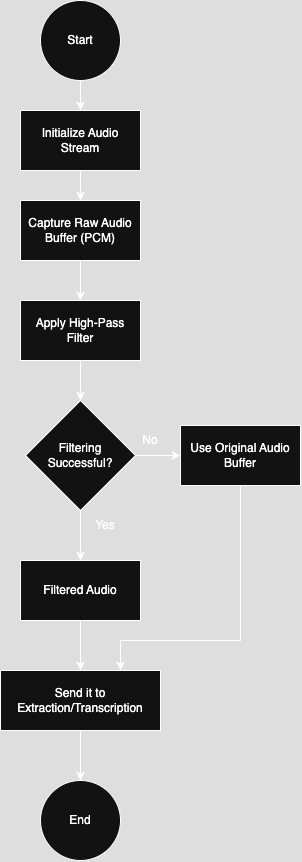
Fig. 1: Block Diagram - System architecture showing data flow from microphone to AR display
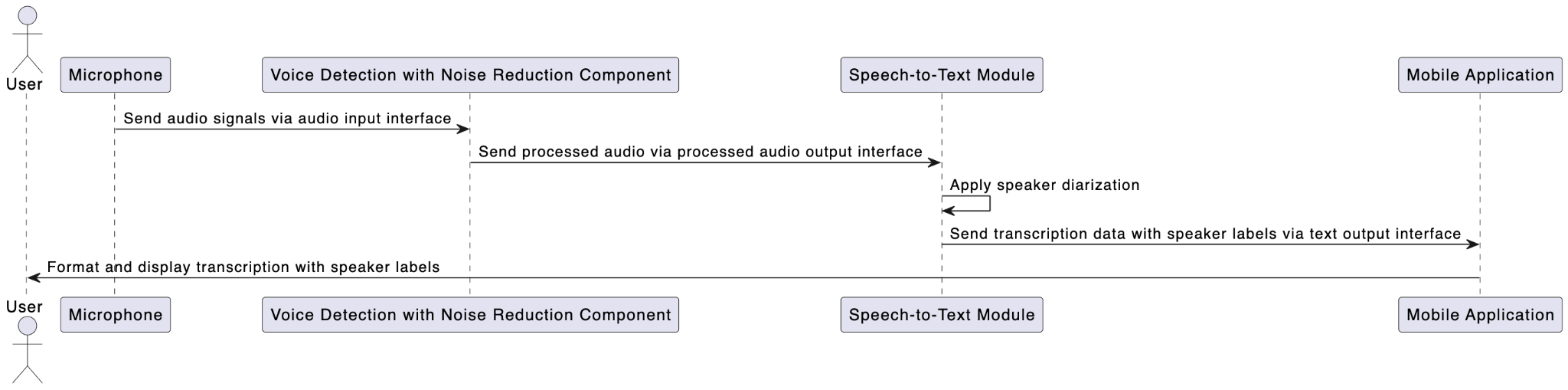
Fig. 2: Workflow Diagram - Processing pipeline from voice detection to display
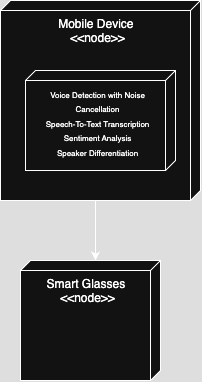
Fig. 3: Noise Cancellation - High-pass filtering algorithm
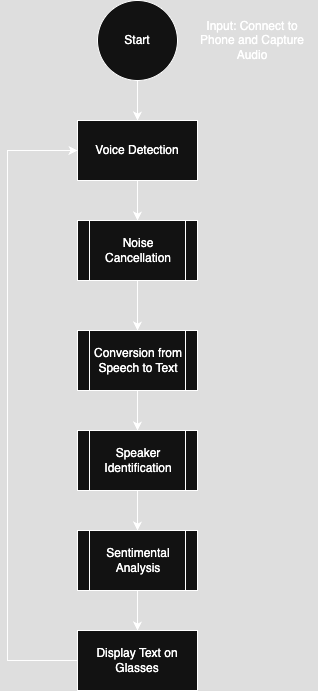
Fig. 4: Speech-to-Text - Voice detection and transcription process
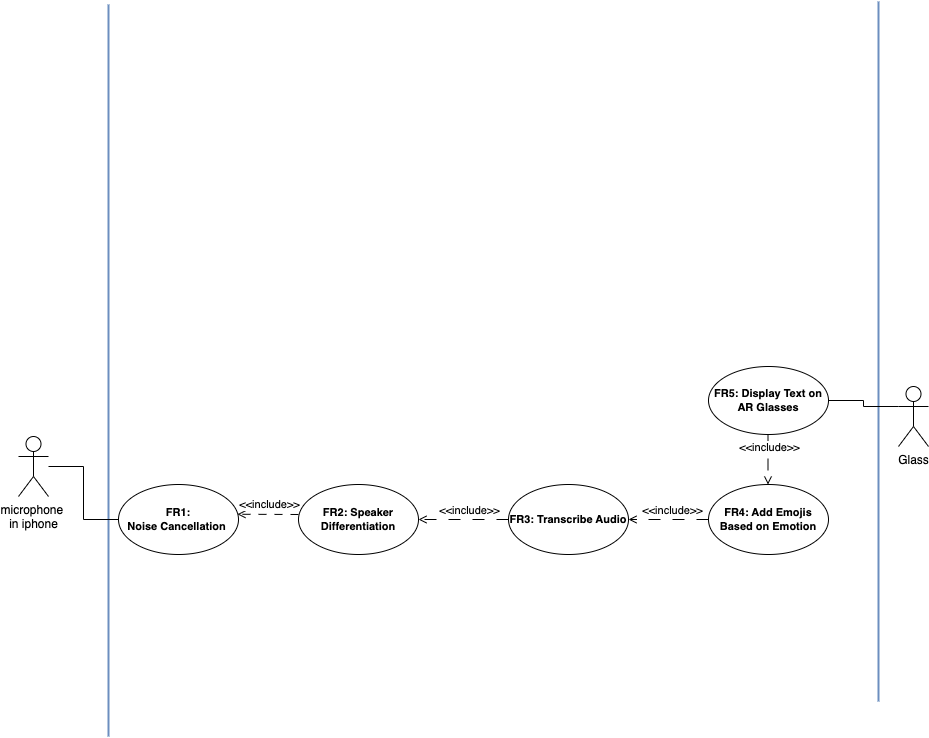
Fig. 5: Sentiment Analysis - Emotion detection workflow
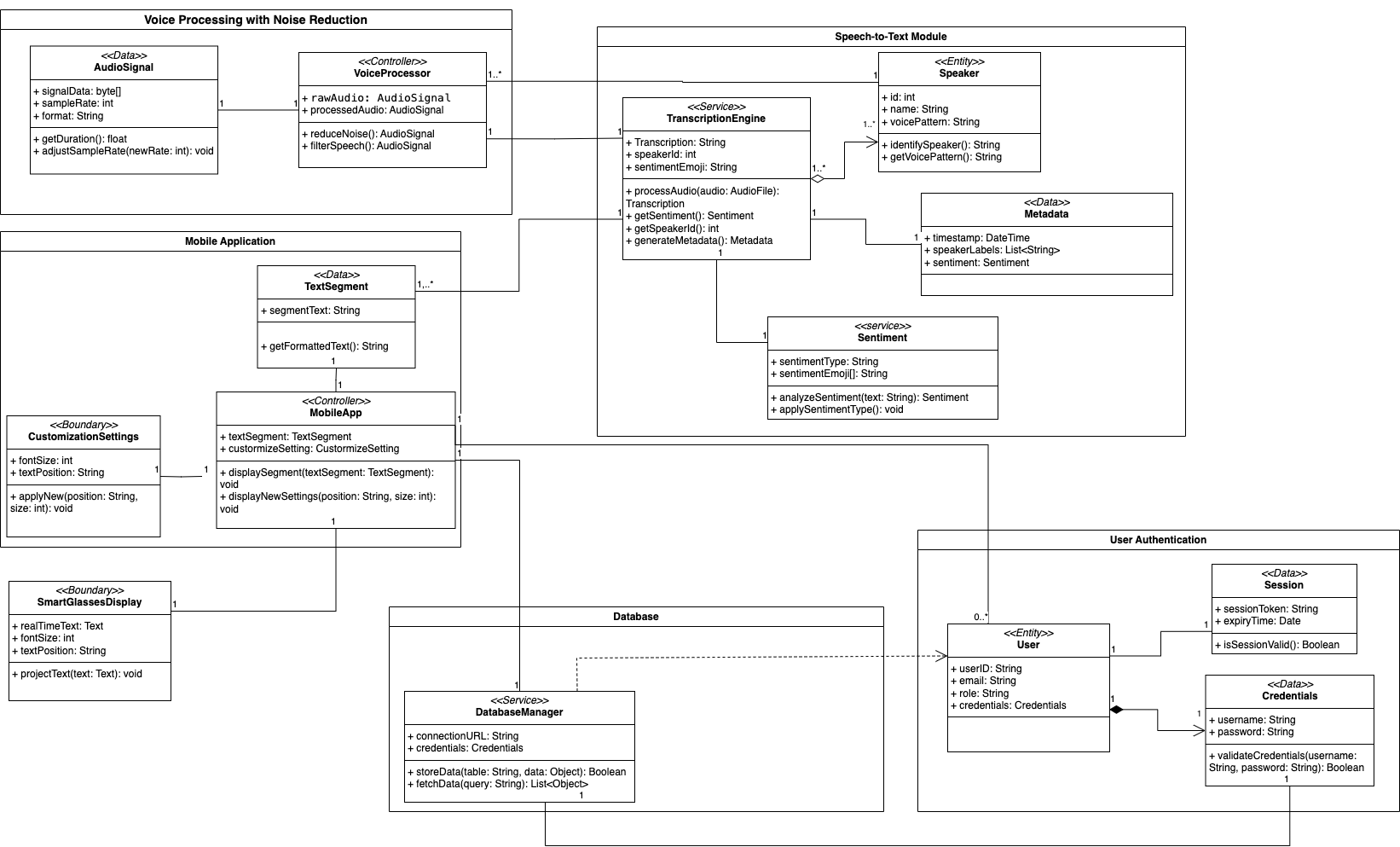
Fig. 6: Use Case Diagram - User interaction with system modules